

-
How to Order
- How To Order Brochures -Step by Step
- How To Order Brochures -Video
- How get Condo-CoOp or Apartment Counts for Mailing List
- How To Order Your Postcards
- Create a Mailing Campaign Using Your Saved Lists On File.
- Where Do I Upload My Brochure File?
- Custom Design - Postcard
- Using my own art file from my brokerage online designer
- Compass Marketing Center Export Your Design File to Upload
- How to Apply a Discount Coupon at WayBetterPostcard
- Ordering Offline – Important Information/Notice
-
Postcards | Direct Mail
- How get Condo-CoOp or Apartment Counts for Mailing List
- Turnaround and In Home Arrival Direct Mail
- Postage Methods / Class
- Postal Categories - Letters vs Flats
- Choosing the Right Postcard Size for Your Direct Mail Campaign
- Smudge Or Scuff Marks
- The Power of Consistency in Direct Mail Marketing: Why Frequency Matters
- USPS Size Categories & Mailing Information
- EDDM for Full Service - How To
- EDDM Print & Ship - How To
- Direct Mail Products Guide
- List Counts & Budget Guidance
- EDDM - Do it Yourself with WayBetter Cards
-
PRINT TURNAROUND & SHIPPING
-
Mailing Lists
- List Builder - Upload your Own List
- List Builder - Use My List On File
- What Is My Mailing List?
- List Builder - Closest Relevant Homes
- List Builder- Map My Mail
- List Builder- Subdivision Tool
- List Builder - Condo/Apt Counts
- List Builder - Real Estate Data Filters
- List Builder - Absentee/Renters (SFH)
- What Is Use My List On File
- Defining Your Audience - List Building
- List - Finding The Subdivision From Property Address
- List Builder - Closest Relevant Homes - Advanced
- List Counts & Budget Guidance
- Do Not Mail - Lists
-
- List Builder - Upload your Own List
- What Format And File Names For Uploading My Own List?
- How Many List Can I Upload At Once For A Mailing?
- Can I Save A List I Upload To My Mailing List?
- What If When The Person Moved?
- Why Do I Have To Confirm The Name Field In My List?
- What If I Have Duplicate Names In My Uploaded List(s)
- Upload My Own List - Complete Details
- Do Not Mail - Lists
- More Than Printing - Built for Real Estate Timelines
-
Designer & Templates
-
Other
- Payments & Billing Info
- Portal Manager Access
- Charge On Your Credit Card Statement
- Billing Account & Portal
- Density & Sequence Coding - USPS
- How to Apply a Discount Coupon at WayBetterPostcard
- Do Not Mail - Lists
- More Than Printing - Built for Real Estate Timelines
- Ordering Offline – Important Information/Notice
-
Product Questions
- Choosing the Right Postcard Size for Your Direct Mail Campaign
- Door Hangers
- How Do I Set Up A Booklet?
- How Do I Set Up A Wire Spiral Notebook
- How Do I Set Up Envelopes?
- How Do I Set Up Pages For Saddle Stitch Printing?
- How Should I Set Up Folded Note Cards?
- File Setup & Page Layout for Brochures
- File Setup & Page Layout for Signs, Display, Posters & Prints
- Book Binding Methods - Choose The Best For Your Project
- Upload My Own List - Complete Details
- Smudge Or Scuff Marks
- How get Condo-CoOp or Apartment Counts for Mailing List
- EDDM - Do it Yourself with WayBetter Cards
-
Printing Info | Specifications
- File Specifications And Size For Upload Your Art File
- What Print Ready File Recommendations Should I Follow?
- What Type Of Artwork Can I Send WBP
- How Do I Export a PDF Correctly?
- How Should I Set Up My Bleed?
- What Are The General Postcard Art File Specs?
- Tell Me What A PDF Is?
- What Is A Proof?
- What Resolution Should My File Be?
- How Can I Avoid Transparency Issues?
- What Color Mode Should My Files Be?
- How Should I Set Up A Spot UV, Foil Or Die Cutting Job?
- Canva -Export For Commercial Printing/Uploading
- Compass Marketing Center Export Your Design File to Upload
- Coil/Spiral Bound Book Best Practices
- Canva - Making it work for your commercial printing collateral
- Show Remaining Articles (1) Collapse Articles
-
Papers | Sign Materials
-
Content Marketing
-
Canva - Best Practices
Compass Marketing Center Export Your Design File to Upload
Design/Layout/Artwork
Compass Agents can use the Compass Marketing Center to compose - design their brochures, postcards, books, booklets and even more print marketing collateral. It is a great resource and you can easily export your file and then upload and order from our dedicated Compass Enterprise site.
After you have designed your brochure or postcard or other item, you have the choice to send it to can send it to their larger printer Xpress Docs or you can save it as a PDF and place your order with us
- No min quantity
- Same Day Print and Ship on time sensitive many items
- 3pm EST Cutoff time for Next Day Arrival
- Discounted Next day Shipping
Below is a screen shot of where - that is when you are finishing up in the Marketing Center and ready to order.
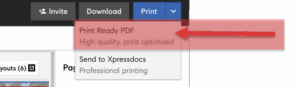
Easy Steps
- Select Print Ready PDF- High quality print optimized and then include add bleed and crop marks.
- This will then download and ask where you want to save to - like your desktop for quick reference.
- Then from our site, place your order and upload your Marketing Center Design file right in the product you are ordering.
This link below should give you a pretty good step by step of how to order brochures and booklets with us after you have downloaded a Print Ready PDF
Brochures and Booklets
Quick Video
Easy Step by Steps
Postcards & Other Direct Mail Products
This link below should give you a pretty good step by step of how to order postcards with us after you have downloaded a Print Ready PDF